Passkeys, FIDO2 & WebAuthn for .NET

Enabling simple, secure authentication and mfa using FIDO2 / WebAuthn

Scenario: Passkey sign-in (usernameless)

This is the closest thing to a real passkey experience: no username, no password. Registering requires the resident key (discoverable credential) option, so the credential itself carries enough information for the authenticator to find it. Signing in, the user picks their account from whatever passkeys their device or credential manager offers — there is nothing to type.

Note: "passwordless" means no password is sent over the internet or stored in a database. A PIN or biometric might still be used locally, by the authenticator, to unlock the passkey.
Register user

Optional - but recommended.

Sign in

Explanation: Passkey sign-in with FIDO2

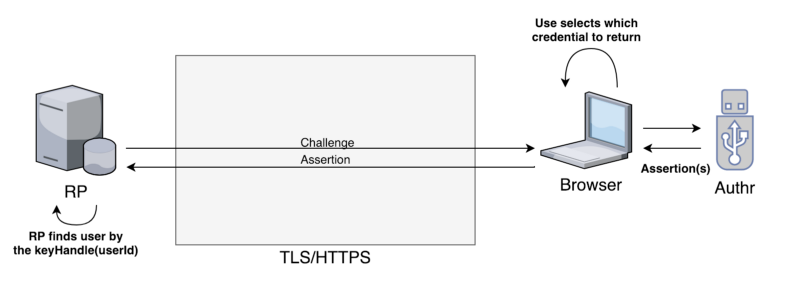
A passkey is a discoverable WebAuthn credential: one the authenticator can find on its own, without the Relying Party naming it by ID first. That's what makes typing a username unnecessary here, and it's what the resident key / residentKey option requests at registration. The flow is visualized in the figure below.

figure visualizing username and challenge sent together with assertion

The Relying Party can still ask for user verification (PIN or biometrics) by setting UserVerification to required — two factors in one gesture, since unlocking the passkey both proves possession of the private key and verifies the person. Setting it to discouraged instead checks only user presence, minimizing the interaction needed to sign in.

Read the source code for this demo here: usernameless.register.js and usernameless.login.js — these set the options that make this scenario what it is. The ceremony they run is shared by every scenario and lives in webauthn.js.